One plant on two boxes
A plant can run on more than one machine against one PostgreSQL. Kill either machine and the plant keeps going: the dashboard answers on the other machine's address, the machines keep being read, production is booked once, and a person signed in on one is signed in on the other.
The decision behind this, and what it deliberately does not do, is 0042.
The words
A plant is its database. Everything a plant knows is in there, which is why the thing that decides who may write is in there too.
A node is one supervisor and its children, started by
fsmes plant <name> run --node <id>. Every node serves the API, so every
node can answer a browser. Nodes are equal; none of them is the primary.
Three roles run on exactly one node at a time:
| Role | What it is | On a real plant |
|---|---|---|
reader |
everything run-opc-agent does: reading the machines, booking counts, the order-code downlink, the connection rows |
yes |
floor |
the simulated floor | no — a simulated plant only |
housekeeping |
the hourly tag-history prune | yes |
A node holds a role by holding its lease: one row in plant_leases,
renewed every third of lease_seconds. A node that holds nothing is a
standby — it serves the dashboard and waits.
Turning it on
In the plant's pack:
[serve]
# Both nodes must sign sessions with the same key, or a person signed in
# on one is a stranger on the other. The pack names the variable; the
# variable holds the secret.
secret_key_env = "MES_PLANT_SECRET"

[storage]
database_url          = "postgresql+psycopg://[email protected]/kc1"
database_password_file = "/etc/fsmes/kc1-password"

[redundancy]
enabled       = true
lease_seconds = 10
Then the schema, once, from any one box — run serves a plant, it does not
create one, and a node whose database has no lease table stands by and says
so with this command in it:
fsmes plant kc1 init # or `fsmes plant kc1 migrate` on an existing plant
Then on each box, with MES_PLANT_SECRET set to the same value:
fsmes plant kc1 run --node box-one
fsmes plant kc1 run --node box-two
Starting both nodes at once is safe: run migrates nothing. And if you do
run the schema command on both boxes at the same time, that is safe too — the
first one into the database holds the migration lock while the second waits
for it and finds the head.
A new database starts with nobody in it. A plant moved onto a PostgreSQL
of its own gets the schema and the pack's master data, and its accounts are
a separate thing: a book built from nothing has none, and every sign-in
answers invalid credentials until somebody makes one. The commands above —
fsmes plant kc1 init and fsmes plant kc1 migrate — make them, and so do
fsmes fleet create and (since 0.4.0) fsmes fleet apply when it finds a
book with no account in it at all. fsmes fleet apply on a plant that has
accounts leaves them alone: it is not the command that brings back one you
deleted on purpose. One account by hand is fsmes add-user.
On a simulated plant this is the failure you will actually meet, because the
floor signs in before anybody does: could not sign in … why=this plant
answered and refused the credentials, so there is likely no FLOOR-SIM account
in its book. That line names the commands that fix it.
--node names the node. Give it a name you will recognise in a log at
02:00 — the host name is the usual answer. Without --node a node calls
itself <host>:<port>.
Two nodes on one box
Two boxes is the point of all this. Two nodes on one box is the cheap way to see it work before you own the second box — and it is how the lab on the author's desk runs — so a pack may name the nodes that run on this machine:
[serve]
api_host     = "127.0.0.1"
api_port     = 8010          # the plant's address: one of its nodes serves here
secret_key_env = "MES_BOTTLING_SECRET"

[[serve.nodes]]
id       = "a"
api_port = 8010

[[serve.nodes]]
id       = "b"
api_port = 8011

[redundancy]
enabled       = true
lease_seconds = 6
Then the fleet commands act on every node the pack names:
fsmes fleet start bottling           # the machines, then node a and node b
fsmes fleet status bottling          # 2 nodes, 2 answered, and what each one holds
fsmes fleet stop bottling --node b   # stops node b; node a and the machines keep going
fsmes fleet stop bottling            # stops both nodes, then the machines
The machines belong to the plant, not to a node. On a simulated pack —
the bottling lab, fsmes demo — fsmes fleet start starts the one OPC
replay both nodes read, before either node, and fsmes fleet stop stops it
after both. There is one of it, shared, like the database: a replay started
inside a node would die with that node, and the surviving reader would see
the line start over from the beginning, which reads as a PLC reset and books
nothing. It is left alone when it is already playing — both when this
installation's own pid file still names it and when anything else already
answers on the endpoint the pack names — so fsmes fleet start is safe to
type at a plant with one node down, and a replay you started by hand, or the
one docker compose owns, is never stopped by fsmes fleet stop. It writes
its log under logs/bottling/machines/.
On a plant whose pack says simulate = false there is nothing here to start:
its machine layer is a PLC somebody else runs, and the nodes are two readers
of it (A real plant below).
fsmes fleet stop <plant> --node <id> is a graceful stop of one node — it
is asked, then told, and it lets go of its leases on the way out. It is for
taking a box down on purpose, and it is not the proof that the plant
survives a box dying: that proof is a kill, which is what
scripts/kill-a-node.sh does and what the measurements below were taken
from. A node the pack does not name is refused by name, with the nodes it
does have.
Each node keeps its own pid file and its own log directory
(logs/bottling/a/, logs/bottling/b/), so stopping the plant stops both
and a failover is readable in one node's log without the other's lines in
it. fsmes fleet start on a plant with one node already up starts only the
one that is down, which is what you want after killing one on purpose.
What fsmes pack check refuses here, so that you find it before half a
plant is running: two nodes sharing a port (one of them would fail to bind
and the plant would look healthy on the other), two nodes sharing a name
(they would take each other's lease and both believe they hold it), nodes
named by a pack whose [redundancy] is off (both would read the machines
and book every count twice), and nodes with no secret_key_env between
them (whoever signed in on one would be signed out the moment the other
answered).
A plant that names no nodes is the ordinary plant on one address. That is almost every plant, and nothing above changes it.
Two nodes on one box, on Windows. A Windows job in CI
(two-nodes-on-windows) starts the PostgreSQL the runner image ships, writes
the two-node pack above, and then types the three commands a person would:
fsmes pack check, fsmes fleet create, fsmes fleet start. It checks that
both nodes answer /health under their own names, that each of the three
roles is held by exactly one node, that both nodes say the same thing about
who holds what — the holders are in the database they share — that
fsmes fleet status names both, and that fsmes fleet stop stops both and
leaves neither port answering.
What is not proven on Windows is the kill. Popen.terminate() there does
not go through the plant's own shutdown handler, so a node killed on Windows
stops by a different mechanism than a node killed on Linux, and the takeover
that follows is a different thing to measure. The lease, the takeover in
lease units and the counters that must not be booked twice are proven on
Linux — the postgres job's two-node test, the two-nodes-in-compose job,
and a run by hand on the author's box. So: starting, answering, holding and
stopping two nodes is proven on both platforms; surviving a kill is proven on
Linux only, and nobody should read the Windows job as more than that.
A real plant: the reader is its own service
fsmes plant <name> run serves the API. On a plant whose pack says
simulate = false it has always served only the API — the reader that
subscribes to your OPC server is a service of its own (connecting
read-only), and on a redundant plant you run one per box:
MES_REDUNDANCY=true MES_NODE_ID=box-one MES_LEASE_SECONDS=10 fsmes run-opc-agent
fsmes plant run reads the pack's [redundancy] block and hands it to its
own children; a service you start by hand reads the same three settings from
its environment. Give MES_NODE_ID the name you gave --node, so the lease
row, the log and the dashboard agree about which box is which.
Both boxes run an agent. Both wait on the lease; the one holding it reads the
machines and books, the other books nothing until the holder stops renewing.
A simulated plant — the bottling lab, fsmes demo — starts its reader inside
the node, so for those the two commands above are the whole thing.
Two nodes on one box, for a rehearsal, differ by port as well:
fsmes plant kc1 run --node a --api-port 8111
fsmes plant kc1 run --node b --api-port 8112
Each node writes its logs in its own directory under the plant's, so two nodes on one box never append to one file.
What it refuses, and why
- A SQLite URL. A file database cannot be shared by two boxes. The single-box SQLite demo is unchanged and needs none of this.
- A signing key nothing set.
[redundancy]with nosecret_key_env, or with a variable that is not set in the environment that starts the plant, refuses to start in one sentence. The lab's own default key is refused too: it is a convenience for a demo, and two boxes agreeing by luck is not redundancy. lease_secondsunder 2. A lease shorter than the time a busy box can take to renew one is a plant that fails over because it was busy.
Run it with docker compose
If you would rather see it than read about it, there is a compose file that is one plant on two nodes: one PostgreSQL, one machine layer, two nodes of the lab's bottling plant, and nginx in front of them so there is one address.
docker compose -f docker/docker-compose.redundant.yml up --build   # 1
# open http://localhost:8000/dashboard                             # 2
docker compose -f docker/docker-compose.redundant.yml kill node-a  # 3
docker compose -f docker/docker-compose.redundant.yml start node-a # 4
What you see:
- Four or five minutes the first time, while the image builds and the line's replay data is generated. Then the log settles into two nodes talking to one database, and one of them saying it took the three roles.
- The dashboard, on one address, with the header saying served by a ·
machines read by a. The counts move while you read it. Sign in as
ADMIN/admin. - A power cut, as far as the plant is concerned:
killsends no shutdown and waits for nothing. Leave the page open and do not reload it. Within about a lease the header says served by b · machines read by b and the counts carry on from where they were — not from zero, because the counter baselines the dead node left behind are in the database. You are not asked to sign in again: both nodes sign sessions with the same key. - Node a comes back as a standby. It serves the dashboard again and holds nothing, because b is holding the roles and a node that comes back does not take work off a node that is doing it.
One command does all four and checks every claim in them:
bash scripts/kill-a-node.sh
It prints the takeover in lease units with the bound beside it, how many
requests the one address refused while a node died (it should be none), what
each machine booked against what its counters moved, and how many readings
were stored twice (it should be none). It is a shell script because
everything in it is docker compose and SQL; the MES itself knows nothing
about containers. The same script runs on every pull request in the
two-nodes-in-compose job, so this page cannot quietly stop being true.
When you are done: docker compose -f docker/docker-compose.redundant.yml
down -v throws the containers and the data away.
Two things about this compose file worth knowing before you copy it:
- The machine layer is one service, shared. A simulated OPC server
started by a node would die with that node, and the surviving reader would
see the replay restart from the beginning — which reads as a PLC reset, so
nothing would be booked. A real plant has one PLC and points both nodes at
it; that is what this file imitates. It is also why a redundant plant's
nodes never start
run-opc-simthemselves. - The pack is the lab's bottling line with three things changed, in
docker/redundant/plant.toml: a PostgreSQL URL, asecret_key_env, and[redundancy] enabled = true. Nothing else about the plant differs. The other compose file,docker/docker-compose.yml, is untouched and is a different demo: one plant, N stateless API replicas, one of everything else.
Seeing which node is which
/health carries a node block: the node's name, whether it was named or
is calling itself after its host and port, lease_seconds, the roles this
node holds, and who holds each role.
fsmes plant kc1 status --api-port 8112 prints the same as a line a person
can read:
  kc1          healthy            supervisor       http://127.0.0.1:8112
               ACME Beverages / Kansas City
               node b, holding floor, housekeeping
The dashboard says it in its header: served by b · machines read by a. If the line says machines read by nobody yet, no node holds the reader lease — which is what you see in the seconds after a failover, and what you would see if the database were unreachable from every node. The header follows a failover on the page's own poll — within five seconds, with no reload — so a page left open on a phone shows the takeover as it happens.
The fleet console shows a plant whose pack names its nodes once,
with its nodes under it: how many there are and how many answered, then one
line each saying where that node is and what it holds in words — reads the
machines, runs the floor, prunes the history, or nothing yet for a
standby. A node that did not answer is unknown there and never a node
holding nothing. Its fleet.json carries the same, node by node, for
anything else that wants to read it.
A plant with nodes is also read at whichever node answers. The address in
its pack is one node of it, so when that is the node that died, the console
and fsmes fleet status ask another one and fill the row from there — the
plant is answering, because it is. The silent node is still named as silent
on its own line underneath. The node that answered has to be the same plant:
it is asked the same ownership question as the first address, and a port
answering as something else is refused rather than believed.
fsmes fleet stop and fsmes fleet apply ask every node for the same
reason. Both act on a running plant and refuse one that has gone silent, and
a plant whose first node is the one that died is a plant that is running —
stop is the verb a person reaches for next. When no node answers at all,
the refusal counts the pid file each node writes, not one file a plant with
nodes never has, and says how many it read.
What a failover costs
One lease, plus a renewal interval to notice, plus whatever the new holder
needs to connect to the machines. With lease_seconds = 10 that is on the
order of fifteen seconds in which no counts are booked — and then they are
all booked, because the counters are absolute and the baseline the dead node
left behind is in the database, committed in the same transaction as the
booking it belongs to. Nothing in the gap is lost; it arrives late.
Measured on a developer's machine on 2026-10-15, two bottling nodes against
one PostgreSQL with lease_seconds = 4 and the line replayed at 6x: the
reader role moved 1.00 lease units after its holder was terminated and the
floor role 1.19, and production booked across both failovers equalled the
counters' own movement exactly, per machine. Your numbers will differ; the
shape will not.
Or watch it cost something. One plant as two nodes side by side, each on its
own address, and a real docker kill on the one holding the machines:
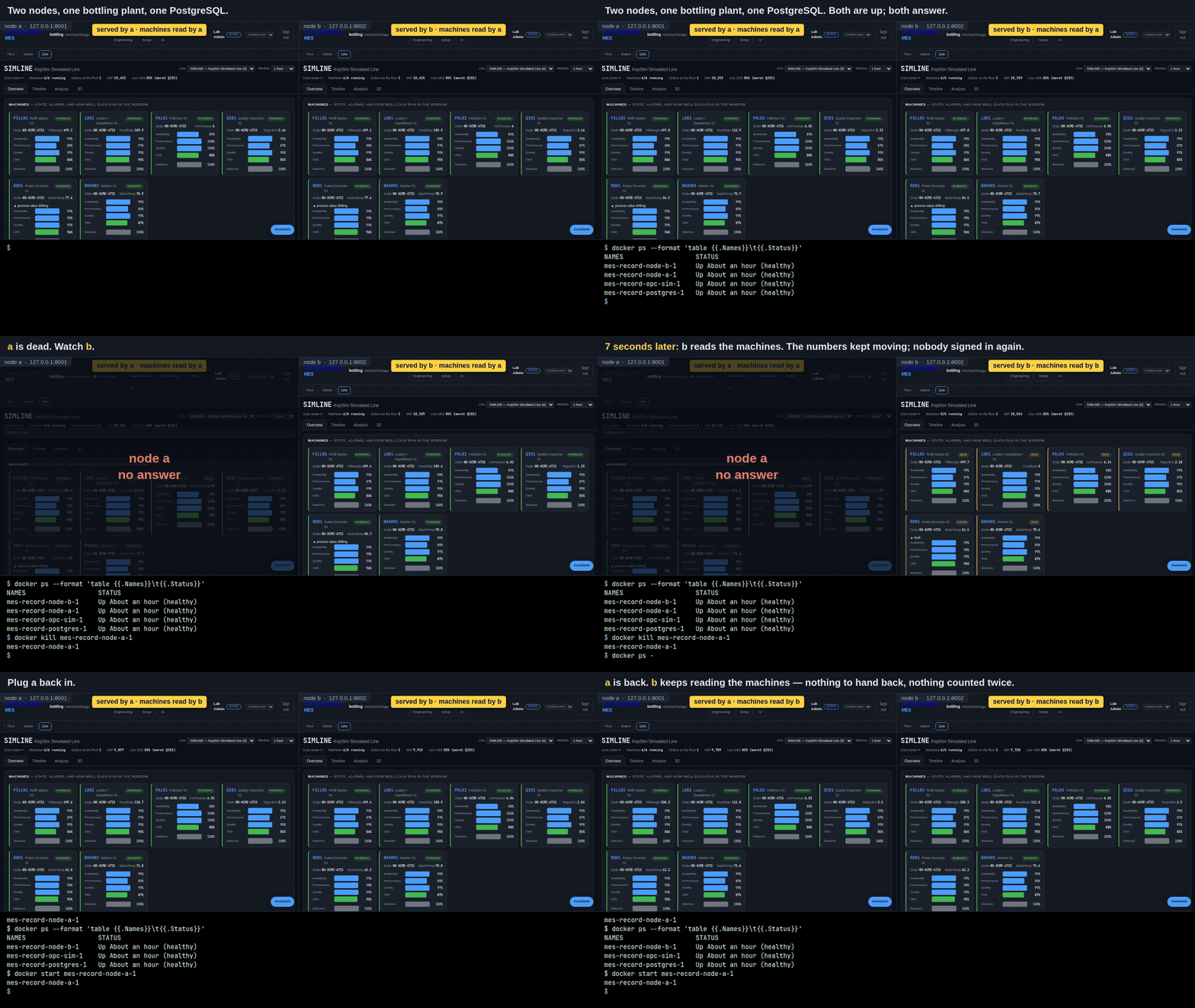
Node a held the machines and was killed; node b was reading them 6.6
seconds later; node a answered again 1.2 seconds after docker start,
holding nothing. Two things in it are staged and nothing else is: the
yellow line is the dashboard's own header line, enlarged so it can be read
at this size, and the grey "no answer" panel is drawn by the recorder over
a page that is really greying itself and saying "reconnecting". The seconds
are the ones measured on the machine it was recorded on, and they are
printed by the script that records it: bash scripts/record-kill-a-node.sh
from a checkout makes the whole thing again, so the picture can be of the
version you are running rather than of the day it was first made. (The
same minute as an mp4, if a loop is
distracting.)
One thing in it is worth reading twice. For the few seconds between the kill
and the takeover the machine cards go idle and the line reads 0/6 running,
and then they are all running again. That is this being a simulated plant:
the floor that moves those machines is itself one of the jobs held by a lease,
so it stops while its lease moves, exactly as the reader does. On a real plant
the machines are machines and do not pause — what pauses is the MES reading
them, and the counters are absolute, so the units made in the gap are booked
when the new holder catches up rather than lost.
A node that comes back comes back as a standby. It does not take a role the other node is holding.
What this does not do
- The front door is yours. Two nodes are two addresses. Give people one
of them with a DNS name they can repoint, a floating address, or a proxy —
nginx in front of both nodes, as
docker/docker-compose.redundant.ymldoes. This product does not pick for you. - The database is not made redundant by this. One PostgreSQL is one PostgreSQL. Its own standby, its own backups and its own failover are PostgreSQL's job, and well-documented there. See Backups for what this product expects you to keep.
- The PLC write path is single by design. Writing a setpoint back to a machine runs under the reader's lease and goes no further. Write-back is not a built feature of this product.
- ERP sync, the UNS publisher and the inbound watchers are still single by assumption. They are separate commands; run one of each. They take the same lease when they are made redundant.
- A conversation on the AI tab starts over after a failover. The thread lives in the process that started it. What was asked and what was answered is in the database; the thread is not.
If it goes wrong
| What you see | What it means |
|---|---|
| Both nodes say standby and nobody holds the reader | No node can write to the database. Look at the database, not at the nodes. |
A node exits at start with one sentence about MES_SECRET_KEY |
secret_key_env names a variable that is not set in the environment that started the plant. |
A node exits at start with one sentence about MES_DATABASE_URL |
[redundancy] with a SQLite URL. |
| The dashboard says machines read by a node that is gone | The lease has not expired yet. Wait lease_seconds. |
| Counts stop and do not resume | Check the surviving node's log for standby: another node holds this role — if it says that forever, the dead node's lease is being renewed by something, which means the node is not actually dead. |