Your plant in FactorySemantics, without sending anyone your data
What it is. A folder — inside fsmes-assistant.zip on the release page, or
fsmes skills unpack plant-from-your-mes . out of an installation — that
you unpack next to your own AI assistant. You ask it "I want to put my plant
into FactorySemantics without giving away anything proprietary — how?", and it
walks you through read-only queries against your own MES database, in widening
steps, and writes one file: plant-shape.toml.
You read that file before it goes anywhere. Then it is yours to send, or not.
Nothing in this folder runs a simulation and nothing in it needs the internet. Producing the file is the whole job.
Then one command turns that file into a plant you can click around, on the PC you installed FactorySemantics on:
fsmes demo from-shape plant-shape.toml --name acme
It asks you one question — how many pieces of space there are between two
machines — and starts a plant with your machine count, your line order, your
rates and scrap, your tags' units and noise, your stop mix, your order sizes and
your shifts on http://127.0.0.1:8010/dashboard. The whole path is below.
What leaves the building
One text file. It holds counts, shares, distributions and patterns:
- how many machines, in line order, as
ST-01,ST-02… - how fast each one runs, how much it scraps, how long it actually ran
- every tag as
AN-01,CT-01,DS-01— what kind of signal it is, its unit, where it sits, how much it wobbles, how often it is sampled, and whether it only moves while the machine runs - the share of time in each state, how long stops last, what kind of thing goes wrong as a category, and how many stops carry no reason at all
- your quality loop: checks, failures, non-conformances, what happens to them
- order sizes, how long an order stays open, your shift pattern
- how you number your paperwork, as a shape:
AAA-AA-### - what your MES says to your ERP — how often, how big, how often it fails — as a shape, not as endpoint names
- and a list of things your MES tracks that FactorySemantics does not model yet, described by shape. Tool changes and their cost, energy, whatever you have. That list is a feature request written by your own plant.
What does not leave
No order number, work order, job, batch, lot, serial, pallet or container id. No person, operator, customer, supplier or crew name. No item code or description. No price. No address. No free text of any kind — not a downtime note, not a comment, not a title. No recipe values. Not one of your table or column names.
Your downtime wording stays in your database. The file carries the category — mechanical, electrical, material, quality, operator, changeover, maintenance, tooling, process — and a sentence we wrote, trimmed to the same length as yours, so a simulated plant reads like a plant and not like a form.
Three things that make that checkable rather than a promise
- Every query is
SELECTonly and bounded. They are short, they are inqueries/, and you can read all thirty-four of them in ten minutes. A test in this repository fails if one of them ever containsINSERT,UPDATE,DELETE,DROP,CREATE,EXECor a second statement. - Nothing phones home and nothing installs. The three scripts use the Python standard library and nothing else — no database driver, no package, no network code at all. A test fails if one of them ever imports anything else.
- The leak check can refuse. Before the file is written, every identifying string in your database is compared, case-insensitively, against the finished text. If one appears, the file is not written. Its verdict is the first thing in the file: "passed: 0 of 1,015 identifying values appear in this file".
The whole path, end to end
Four moves, three machines, nothing leaving the building. The only machine that ever needs the internet is the one you install on, and only once.
1. Install, once, on the PC you will watch the plant from
pipx install factorysemantics-mes
fsmes --version
pipx install factorysemantics-mes     # or: uv tool install factorysemantics-mes
fsmes --version
2. Write the assistant folder out of the installation — offline
The folder is already inside the installed package. This copies it somewhere you can carry it. No release page, no zip, no internet.
fsmes skills list
fsmes skills unpack plant-from-your-mes .\assistant
fsmes skills list
fsmes skills unpack plant-from-your-mes ./assistant
Copy assistant\plant-from-your-mes onto the box that has your MES on it — a
network share, a memory stick, however files get there at your site.
3. On the MES box: three commands, by hand
That box needs no fsmes, no database driver, no internet and no AI — just a
python 3.11 or newer. The scripts are standard library only and a test in this
repository fails if one of them ever imports anything else.
cd .\plant-from-your-mes
python scripts\profile.py --sqlite plant.db --propose-mapping mapping.toml
# read mapping.toml back to somebody who knows the schema, and correct it
python scripts\profile.py --sqlite plant.db --mapping mapping.toml --out plant-shape.toml
python scripts\explain.py plant-shape.toml
cd ./plant-from-your-mes
python scripts/profile.py --sqlite plant.db --propose-mapping mapping.toml
# read mapping.toml back to somebody who knows the schema, and correct it
python scripts/profile.py --sqlite plant.db --mapping mapping.toml --out plant-shape.toml
python scripts/explain.py plant-shape.toml
On SQL Server there is no driver here on purpose — see On SQL Server, where there is no driver below. The middle command runs the leak check and refuses to write the file if one identifying value from your database got in.
Read plant-shape.toml. It is yours. Carry it back to the first PC.
4. One command, and the plant is on screen
fsmes demo from-shape .\plant-shape.toml --name acme
fsmes demo from-shape ./plant-shape.toml --name acme
It asks you one question — how many pieces of space sit between two machines,
the conveyor or the table or the tote — because no MES records it and it is what
decides whether a stopped machine starves the next one. The default is 20. Then
it builds the plant, generates one eight-hour shift, starts the simulated floor,
a real OPC UA server and the dashboard on http://127.0.0.1:8010/dashboard, and
tells you how to sign in.
--buffer 20 --yes answers the question in advance, for a script. Stop it the
way you stop any plant:
fsmes demo acme stop
This is what came out of the second reference shape — a brownfield plant with two areas, cells under them, two routings that meet at a shared machine, and two machines sharing one OPC device folder. Nothing on these screens was configured: every name, level and parent came out of the shape file.
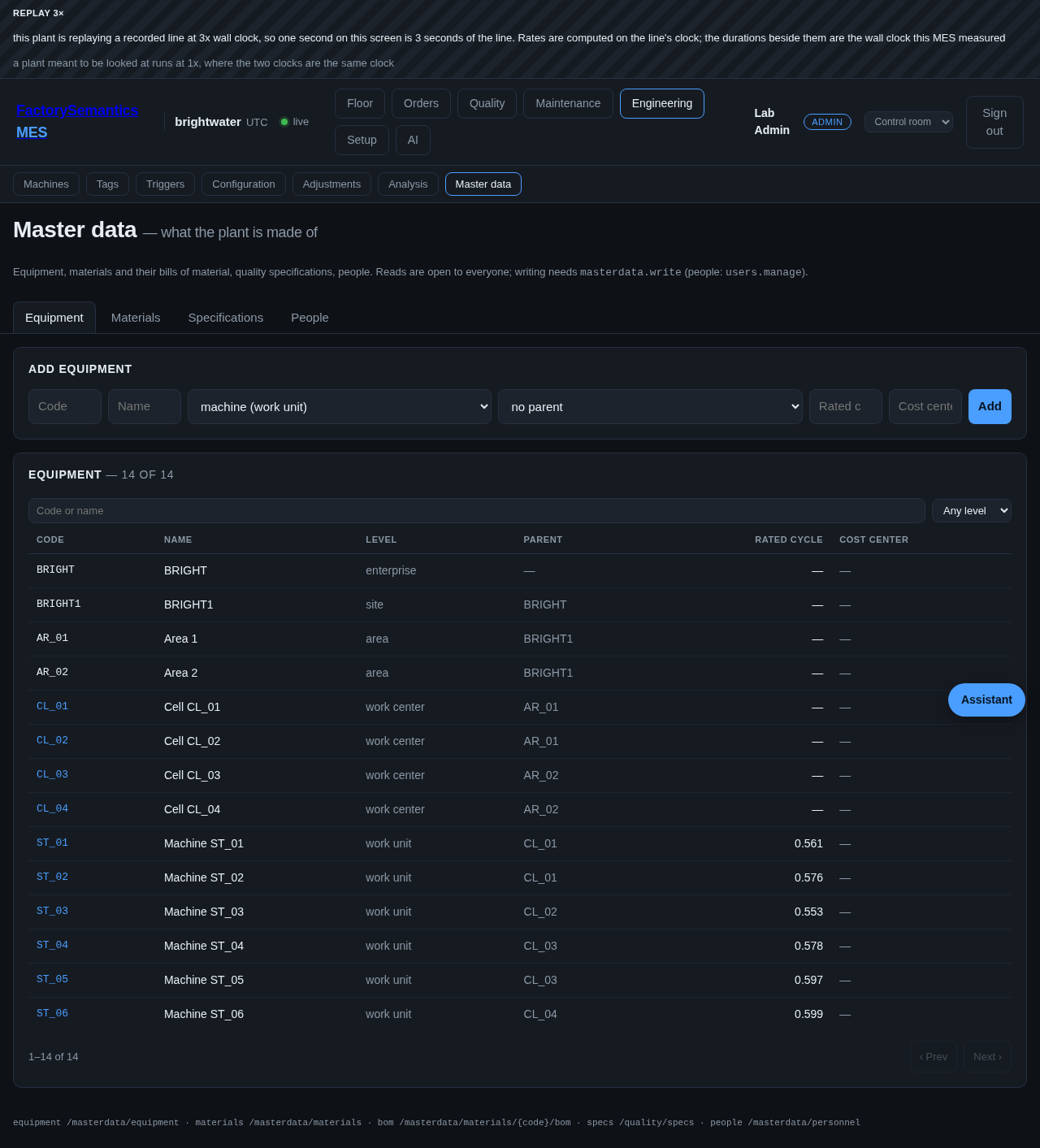
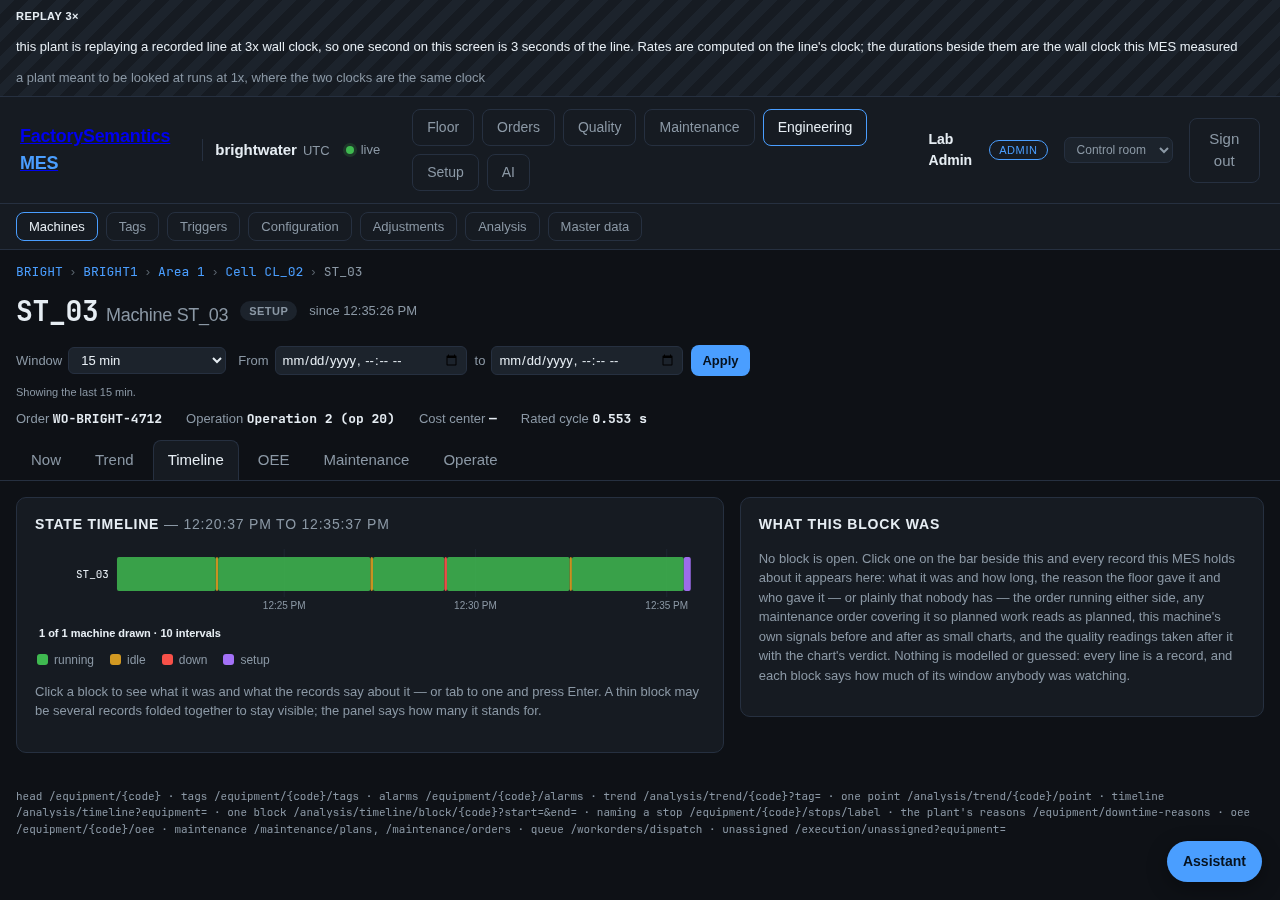
The banner across the top of both shots is the plant saying it is replaying at
three times wall clock, which is how these were taken: a stop that lasts twelve
seconds on the line draws as four seconds here. At --speed 1, the default, the
two clocks are the same clock.
Read the pack before you start anything
fsmes shape plant is step 4 without the plant: it writes the pack, prints what
it did with your shape, and stops.
fsmes shape plant .\plant-shape.toml --out .\acme --buffer 20
fsmes pack check .\acme
fsmes shape plant ./plant-shape.toml --out ./acme --buffer 20
fsmes pack check ./acme
Both commands print three lists, and the lists are the point:
- what was asked — the buffer, and nothing else;
- what is stated here because the shape could not say it — the specification band and where its width came from, and, when your MES has no routing table, that the one routing is your station order rather than a measured route;
- what your shape carries that this plant does not use, with one line each
saying why. Counter and discrete tags, the range each tag was seen in, your
numbering grammar, your ERP call rates, the tables the skill could not map.
Twelve of them for our own bottling example. They are in the pack too, under
[from_shape]inplant.toml, for whoever opens it later.
What the shape carries that the plant uses
Your machine count and their line order; each machine's rate, scrap share and
run time; every tag's kind, unit, base, spread, sampling interval and whether it
only moves while the machine runs; the share of time in each state and how long
stops last; your stop categories, as downtime_reasons.json, in your own
proportions; your quality loop's check and failure rates and its dispositions,
as nc_severities.json; your order sizes, as a book of work orders; and your
shift pattern. With a format 2 shape it also carries your areas and cells,
your routings, and how your tags are grouped under channel/device folders — see
FORMAT.md.
Step 3 in more detail
SQL Server first, because that is what the first plant to try this runs. SQLite works too and is what this repository's own test uses.
The folder also ships on the release page, for a box that never sees the pip
install. It is stage 2 of fsmes-assistant.zip, which is the one download:
unzip fsmes-assistant.zip
cd fsmes-assistant/plant-from-your-mes
Out of an installation instead, with no download at all:
fsmes skills unpack plant-from-your-mes .
cd plant-from-your-mes
Your assistant reads SKILL.md and does the rest. If you would rather drive it
yourself, it is the three commands again, with what each is for:
# 1. Guess which table is which, from names alone. Read this back out loud —
#    it will get some lines wrong, and correcting it is the whole skill.
python scripts/profile.py --sqlite plant.db --propose-mapping mapping.toml

# 2. Write the one file. This runs the leak check and refuses on a hit.
python scripts/profile.py --sqlite plant.db --mapping mapping.toml --out plant-shape.toml

# 3. Read it back in plain words.
python scripts/explain.py plant-shape.toml
On SQL Server, where there is no driver
The folder deliberately installs nothing, so it cannot connect to SQL Server itself. Two ways round it:
# Get the exact SQL to paste into SSMS, Azure Data Studio or sqlcmd
python scripts/profile.py --mapping mapping.toml --dialect mssql --emit-sql ./to-run

# Save each result as <query name>.csv, then
python scripts/profile.py --csv-dir results/ --dialect mssql \
    --mapping mapping.toml --out plant-shape.toml
There are seventeen queries per dialect. Most come out ready to paste. The
per-table and per-column ones come out as *.template.sql with a line saying
what to substitute — you run those once per table you care about — and so does
any query your mapping has no answer for, a routing table you do not have being
the common one. The script says how many of each it wrote.
In CSV mode the leak check has no database to sample, so save the output of
04b_column_sample.sql as one value per line and pass --samples values.txt.
If you do not, the file says the check ran against a smaller sample. It says so
in the file, where you can see it.
Before you point step 5 at a production box
05b_tag_samples.sql reads your tag history, which is the big table. Look at
the plan: it should be a backward scan of an index on the timestamp, not a sort.
Run it out of hours. Lower --row-cap if you need to. On SQL Server,
01_inventory.sql deliberately uses the row count the engine already keeps
rather than COUNT(*) on every table, because an exact count over a historian
can take minutes and escalate locks — 01b_row_count.sql is there for the
handful where the exact number matters.
What we have actually proven, and what we have not
Proven. The skill is run blind, in this repository's test suite, against a
SQL MES it was not written for: tests/unknown_mes.py builds a deliberately
foreign schema — its own table names, a state column of three-letter words, tag
history in one tall table — and fills it from the bottling line's own generated
hour. With no hint about that schema, the skill proposes the mapping from the
catalogue alone, and the plant it describes is bottling: six stations in line
order, every rate within a tenth of nameplate, every scrap share within a third
of a percentage point, and all twenty analog tags recovered with the right base
and the right spread. Not one order code, lot, pallet, operator code,
inspector code, non-conformance number or technician's note from that database
appears in the output. See
tests/test_a_plant_shape_built_blind_from_an_unknown_sql_mes_is_the_bottling_line.py.
skills/plant-from-your-mes/example/plant-shape.toml is what that run produces.
Read it; it is the best answer to "what exactly would I be sending?"
Also proven: the whole path, on Windows and on Linux, with the network off.
A job on every pull request builds the wheel, installs it in a fresh virtual
environment in a directory holding none of this repository's files, writes the
assistant folder out of the installation, and then runs the three commands under
a second virtual environment with nothing in it at all — import fsmes fails
there, which is the only honest way to prove the scripts need nothing but a
plain python. Every step after the install runs with outbound HTTP pointed at
the discard port, and the job proves that by trying one request itself and
requiring it to fail. It does this twice, for two reference shapes:
- the flat MES — one line, one straight routing, one tag folder per machine, no routing table at all (a format-1 shape);
- a brownfield plant — two areas with cells under them, two routings that meet
at a shared machine, and two machines sharing one OPC device folder (a
format-2 shape), which is
example/plant-shape-grouped.toml.
Both end at a running dashboard with six stations on it, the right number of
areas, the OPC server answering, every machine watched and a counted lot on the
p chart. See .github/scripts/plant_from_shape.py.
Not proven. There is no SQL Server on this machine or on the CI runner, so
no SQL Server has ever parsed the queries/mssql/ set. What is checked is
structural: every placeholder resolves, each query is one bounded SELECT in
SQL Server quoting, and none of the SQLite-only spellings has been copied across
(LIMIT, substr, GROUP BY 1). The first person to run them against a real
instance is the one who finds out whether SQL Server agrees. Expect to fix a
line or two, and expect the timestamp comparisons to be the place it happens:
these queries compare a timestamp column against an ISO text value, which SQL
Server converts implicitly and which can behave differently on a datetime2
with an unusual collation or a non-UTC column.
Also not proven: that the mapping proposal works on anything but the two
invented schemas it has been tried against. It matches on table and column names
and on nothing else. On a real plant it will get lines wrong, which is exactly
why SKILL.md tells the assistant to read the draft back to a person before
profiling with it. A wrong mapping leaks nothing — it describes a plant that is
not yours, and you will hear that in the first three lines of explain.py.
Building the zip
fsmes skills-zip --check            # what CI runs: every folder matches its list
fsmes skills-zip assistant          # writes fsmes-assistant.zip, this folder inside it
uv run python -m zipfile -l fsmes-assistant.zip
fsmes-assistant.zip is the only skills zip a release attaches, and this folder
is in it: a second download would be a second copy of these files and a question
about which one to take. There is still one copy in git — skills/ has no
assistant/plant-from-your-mes/ in it — and the nesting is made at build time
from fsmes.skills.INCLUDES.
The contents are a list in src/fsmes/skills.py, not a glob, so adding a file
to the skill is a line in a diff and a stray file fails the check in either
direction.
Where the file goes next
FORMAT.md in the folder says what every section means and how each field maps
onto the simulator's own line.json. It also lists, plainly, what a plant shape
carries that the generator has no field for yet, and the one thing a plant shape
cannot know and somebody has to be asked: buffer capacity between machines.
No MES we have seen records it.
fsmes demo from-shape and fsmes shape plant read that file and nothing else
— no database, no network — and build a plant pack out of it:
plant.toml, line.json, tag_map.json, floor.json and master data. The
pack format is one folder of declarative data, so the pack a shape
builds is the same kind of thing as the two this project ships, and fsmes pack
check reads it the same way.
Format 1 and format 2
[meta] shape_format says which. A file with no such key is format 1.
| format 1 | format 2 | |
|---|---|---|
| machines, rates, scrap, tags, stops, quality, orders, shifts | yes | yes |
areas and cells ([hierarchy]) |
no — one area | measured where the MES has the tables |
routings ([routings]) |
no — one straight line in station order | measured; a routing that branches stays branched |
how tags are grouped ([tag_nodes]) |
no — one node per machine | measured; several machines can share one node |
A format-1 file still reads exactly as it always did, and it still builds a
plant: one area, one straight line, one node per machine. Where format 2 has no
answer — your MES keeps no routing table, say — the file says found = false
with the reason, the shape report says so out loud, and nothing is guessed in
silence.
Pack-in-pack, routings and OPC structures
A plant with areas, cells and branching routings is one pack with a deeper
equipment.json — no nesting involved. Several plants are the fleet, not a
nested pack. The reasoning and the recommendation are on one page:
a pack inside a pack.