When a control chart notices something
Explanation — for the quality engineer who wants to know what the MES will do on its own, and what it will not.
The two things that happen
A control chart in this MES is not a picture you go and look at. When a reading is recorded, the four Western Electric rules are run over that characteristic's recent readings there and then. A rule that fires is written down as a signal, and the first signal of an excursion raises a quality hold — a non-conformance, in the ordinary lifecycle (open → under review → dispositioned → closed) your supervisors already work.
That is all it does. It does not stop a line, quarantine a lot, scrap stock or write anything to a machine. Rule 4 — eight readings in a row on one side of the centre line — is an early warning, not a fault, and a plant whose line stops for one learns very quickly to switch the feature off.
What the hold tells you
A record a machine opened has to answer why do you think so without anybody having to go and re-derive it. So the hold carries:
- the rule that fired and what it means in words;
- the material and characteristic;
- the readings of the rule's window — one point for rule 1, three for rule 2, five for rule 3, eight for rule 4, and the two either side of the gap for rule 5;
- the chart as it stood: the centre line, sigma, the ±3σ limits and how many readings they were computed from. Not recomputed later — recomputing gives different numbers, and then nobody can see what the MES acted on;
- the station, if a station took the reading. If a person took it with a gauge, this is blank. Blank means not recorded; it does not mean no machine, and the MES will not work one out from the routing.
The hold is raised open, not under review. Under review means a person picked it up, and nobody has.
How often it raises one
Once per excursion. An excursion that runs for twenty readings is one thing that went wrong, and a process going out of control usually trips two or three of the four rules on its way out. Every firing is recorded as its own signal; they all point at the one hold. When somebody dispositions that hold, the next signal is a new finding and raises a new one.
A rule only fires on a new reading. One wild measurement moves the centre line, and every settled reading behind it is suddenly on one side of it — the MES does not go back and raise two dozen holds about a fortnight nobody was worried about until a moment ago.
Fewer than twelve readings raises nothing, and the chart says why. Control limits computed from six points move with every reading.
Several pieces at a time
If a characteristic is inspected one piece at a time, everything above is the chart you get: individuals and moving range, one point per reading.
Some characteristics are not inspected that way. Five bottles come off the
filler every fifteen minutes and are measured together on a bench; what the
plan says is five at a time, and the right chart for that is X-bar and
R. Tell the plant so by setting Pieces per sample on the specification
(the Specifications tab of Master data, or sample_size in your pack's
quality_specs.json). Empty or 1 is one at a time and nothing changes.
With a plan in place:
- The point is the sample's mean, not each reading, and the limits are built from the average range within the samples. That is the whole reason for sampling: the bottle-to-bottle variation is held inside the sample, so the chart answers whether the process moved.
- A second chart watches the ranges. A sample whose five readings
disagree more than they should is rule 5 — the same rule 5 an
individuals chart has, a range beyond its upper limit — drawn and recorded
on every plant and raising a hold where
hold_rulesincludes 5. Worth including: the X-bar limits beside it were computed from the average range, and one inflated sample has just widened them. The bottling lab plant includes it. - The four rules run on the means, once per sample. Five readings that straddle three sigma individually and average inside the limits fire nothing, because the process did not move. One sample is one evaluation and at most one hold, and the evidence names the sample and all five readings.
- Capability is computed from the within-sample spread (
R̄/d2), which is the process's own variation.Pp/Ppkstill use every individual reading, because what your customer received was pieces and not averages. spc_min_pointscounts samples. Twenty points on a line sampling four times an hour is five hours, not twenty readings.
Record a sample whole, with POST /quality/samples:
{"material": "FG-BOTTLE", "characteristic": "fill_height",
 "values": [141.8, 142.1, 141.9, 142.4, 142.0],
 "order": "WO-1042", "equipment": "QI01", "gauge": "HEIGHT-FILL-01"}
Exactly as many values as the plan says. Four, or six, is refused with a
sentence saying how many were expected — and so is a single
POST /quality/checks against a sampled characteristic, because one reading
is not a point on this chart.
Each reading is still stored as its own quality_checks row with its own
value and gauge; the sample is a record that ties them together. Nothing
was backfilled when this arrived: readings taken before a plan was written
have no sample, and if you set a sample size on a characteristic that already
has history, that history is left out of the chart rather than grouped into
samples nobody took. The chart says how many readings it set aside and why.
Quality → SPC draws it. Pick a sampled characteristic and you get two
charts in the same frame as the individuals one: the mean of each sample above
with X̿ and X̿ ± A2·R̄, and the spread inside each sample below with R̄,
D4·R̄ and D3·R̄. One dot per sample on each half, flagged where a rule
fired, and one export takes both. The heading, the legend and the sentences
under the chart say which chart it is — before the first sample as well as
after it, because the chart type is a property of the plan and not of the
data that has arrived so far.
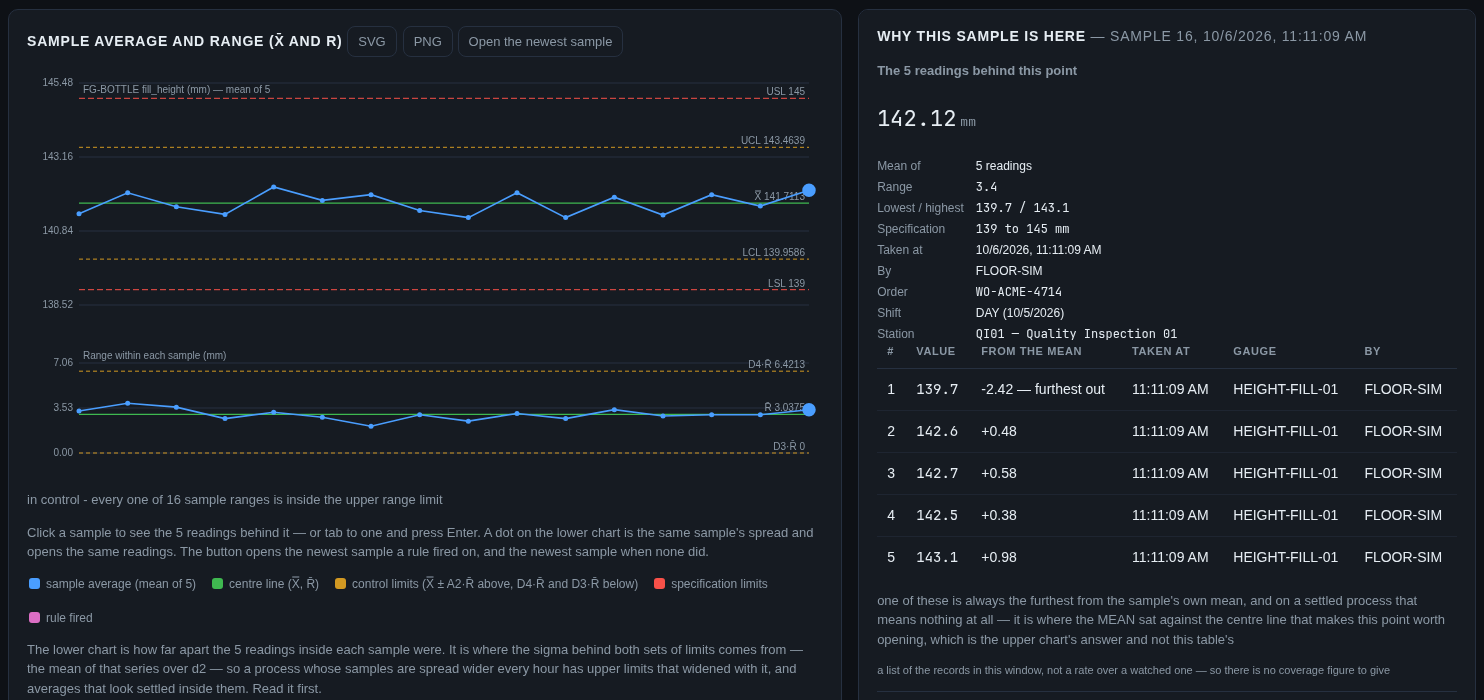
Click a dot and the panel beside it opens on the readings behind that point — see Click a point, below, which is the same panel asked a slightly different question.
The other half of the chart
Quality → SPC draws two charts, not one. Above is the individuals chart — every reading, with the centre line and the ±3σ limits. Below it, about half as tall and on the same timeline, is the moving range: the gap between each reading and the one before it, with its own centre line (R̄, the mean of those gaps) and its own upper limit (3.267 × R̄, the constant for a range of two). That lower chart is where the sigma behind both sets of limits comes from — R̄ over d2, 1.128 for two — so a process whose gaps are drifting has moved the limits on the chart above it, and the lower chart is where you see that happen.
A gap beyond its upper limit is rule 5 — the same rule number a sampled
chart uses for a sample range beyond its limit, because it is the same
statement about a process: a range went past the line it is judged by. It is
drawn, flagged and recorded on every plant, like the other four, but it
raises no hold anywhere unless a plant adds 5 to hold_rules — the
shipped default is still the four Western Electric rules. A plant that upgrades to this version starts recording
moving-range firings from its next reading; nothing is written about the jumps
already in its history. A plant that turns it on gets the same kind of non-conformance, with the
two readings either side of the gap as its evidence. Clicking a dot on the
lower chart opens the same panel as the upper one, on the later of its two
readings.
One thing to watch in how you collect readings
An individuals chart estimates the process's variation from the difference between consecutive readings. So a reading written down twice — the same number recorded again because nothing has been re-measured — is not a second measurement, and it drags that estimate toward zero. Do it often enough and the control limits close in on the centre line until ordinary noise reads as a point beyond three sigma, and the MES will raise a hold about it.
The same thing in a different guise is a gauge too coarse for the tolerance it
is judging: fsmes will tell you about that one directly — the gauge register
applies the rule of ten, with four as the floor, and says when the control
chart is charting the instrument. See GET /quality/gauges/{code}/resolution.
Click a point
A rule firing tells you that a reading is unusual. The next six questions are always the same ones, and this MES already holds the answers — so on Quality → SPC, click any dot on the chart and the panel beside it fills with that reading's records. Click another and the panel follows; nothing else on the page moves. There is no model in it: every line on the panel is a record, and nothing on it is guessed.
What you get, in the order people ask:
| The question | What the panel shows |
|---|---|
| What was read, and by whom? | The value, the specification it was judged against, who took it, when, which order, which shift, which station |
| Which rule fired? | The rule, what it means and the hold it raised — and beside it the firings the MES recorded when the reading arrived, which is not the same question as what the chart says now |
| Did the process move, or did the gauge? | The instrument, its last calibration and who signed it, whether it is overdue, and whether it can resolve the tolerance it was judging. Then the same characteristic by every other gauge in the hour either side, with each one's mean and how far it sat from this one |
| What was the machine doing? | The state at that instant and what it had just come out of, with the seconds between — plus the state timeline, every stretch it was not running, and each stop's reason or the word unlabelled |
| What was the rest of the line doing? | Every other station under the same parent as this one, in this material's routing order where the routing names it, with each stop and changeover in this reading's own window — named, timed against the reading (ended 3 min before this sample), and linking to that station's page |
| What were the process values doing? | This station's analogs over the ten minutes before and the two after, as small charts, each with the reading's own time marked on it |
| What else happened? | A maintenance order that was open, a finding that was raised |
Every block says how much of its own window was watched. The three that are lists of records — the other gauges, the maintenance orders, the findings — say they have no coverage figure, because a list of the records in a window is not a rate over a watched one. And a tag that stopped arriving is drawn as a broken line with its missing buckets counted, never as a line through the silence: a stale value is not a steady one, and telling those two apart is most of why this panel is worth having.
A keyboard reaches it: tab to a reading and press Enter, or use the Open a reading button, which opens the newest reading a rule fired on.
The rest of the line, and what it is not
A reading says what that station was doing. The thing that explains it is often the machine beside it: the packer changing size, the washer stopping. So the panel also draws the rest of this line in the same window — the other work units under the same parent in the equipment tree, each with its stops and its changeovers from the same timeline the station's own block reads.
Read that block as what it says it is. This MES records which line a work unit belongs to; it does not record which way the product travels, so the block never says upstream or downstream and never puts one station's event forward as the cause of another's. The order is the material's routing where the routing names the station — the block says which routing — and the rest after it by code, because a routing's order is a process order and not always a floor's. Stations that recorded nothing but running in the window are named rather than dropped: that is a statement about what this MES holds, not about what the machine did. The block says how many of the line's stations it drew out of how many there are, and a station with no line above it in the tree gets a block that says so instead of an empty one.
The panel opens short
The panel used to run to about four screens, and the three process-value trends were most of it. What you now meet when a dot opens is the reading, the rules, the machine and the rest of the line; the gauge, this station's trends and anything else in this window are one click each, with a summary that says what is inside and how much of it ("3 process values, 2 of 3 drawn"). Open one and it stays open for you — the choice is kept in your browser, per block, so a reader who always wants the trends opens them once.
On a sampled chart, the dot is an average — so the panel opens all five
Everything above holds on an X-bar and R chart, with one block more and one window wider. A point there is the mean of the sample, which is the thing an X-bar chart cannot take apart on its own, so the panel's first block is the readings behind this point: every reading in the sample with its value, its gauge, who took it, and how far it sat from the sample's own mean, with the one furthest out marked. Five bottles all high is a filler setting; one bottle high and four ordinary is a nozzle. That is usually the whole diagnosis, and it is one click.
The panel says in the same breath that one reading is always the furthest, because it is — naming it is a place to look and not a finding. When every reading in a sample is identical it names none of them, rather than inventing a culprit out of the order somebody typed them in; when two sit equally far out it names both.
The window is the one the readings themselves span — first to last, plus the
minutes before — rather than an instant, and every reading's stamp is marked
on every trend, so which bottle was measured while the nozzle pressure was
falling is visible rather than inferred. The rules block names where the mean
sat against X̿ ± A2·R̄ and where the range sat against its own limit,
because the reader came from one half and may need the other. Clicking a dot
on the lower chart opens the same sample as the dot above it: a mean and a
range are two facts about one sample.
Two things it will not tell you
The gauge comparison bounds the question; it does not settle it. Two instruments measuring the same process in the same hour should agree, and a standing difference between them is the instrument — but they measured different pieces. The controlled comparison is one piece measured twice, and no MES can make a floor do that. The panel says so on itself.
The line block is a window, not a cause. Two stations on one line both stopping in the same ten minutes is two records; which one explains the reading — or whether either does — is the reader's call, and the block says so on itself.
A reading with no gauge, or no station, says not recorded. That is not the same as no gauge having taken it, and the MES will not work a station out from the order's routing — that would name a machine nobody stood at.
The same answer, as an API
One read, and the one a screen gets:
GET /quality/spc/{material}/{characteristic}/point/{check_id}
GET /quality/spc/{material}/{characteristic}/sample/{sample_id}
The second is the same read of a sample: the same blocks, plus the readings,
over the window those readings span. before_minutes, after_minutes and
neighbour_hours move the window on either; ten, two and one are the
defaults. Nothing in it is worked out for the panel: the
control limits come from the chart, the trends and the timeline from
/analysis, the gauge's due date from the gauge register, the coverage from
the ledger. So a figure on the panel and the same figure on the analysis screen
cannot disagree.
Making something else happen
What a plant does next is the plant's decision, so it is configuration, not
code. The trigger catalogue offers a tag called spc.signal: no PLC
publishes it, the MES raises it on the station whose reading tripped the
rule, and its value is the rule number. Draft a trigger on it the way you
would on any tag:
| Field | Value |
|---|---|
| Tag | spc.signal |
| Machine | the moulder, or any machine |
| Condition | equals, threshold 1 — rule 1 only |
| Action | set_machine_down, or create_maintenance_order, or log_event |
A trigger is a draft until somebody approves it, and a signal on a reading with no station recorded reaches no trigger at all.
Which readings reach the chart
A station that inspects every unit publishes its measurements as Insp_*
tags. A measured characteristic becomes a quality check — and therefore
appears on the chart and can trip a rule — when your plant has written a
specification for that material and that characteristic name. One with no
specification stays an inspection on the unit, and the ingest counts it and
names it as uncharted rather than dropping it quietly.
So the plant chooses what is charted, by writing specifications. That is
deliberate: without the choice there would be a row in quality_checks for
every attribute of every unit at line rate, and a control chart nobody asked
for is not a kindness.
A station reading that is out of spec opens no hold of its own. The station has already judged the unit and the unit is already good or scrapped; one record per bad piece on a machine inspecting ten a second is a list nobody reads. What raises the hold is the signal.
A reading a person records still opens a hold when it is out of spec, as it always has. A person measuring one bottle has found one bad bottle, and that is a finding.
The reasoning, the options that were rejected, and what has still to be decided are in decision record 0027. Why the chart type follows the sampling plan, and why a range beyond its limit is rule 5 on either chart, is 0040.